Sony headphones, controlled from GNOME Quick Settings and the Linux desktop
Noise cancelling, ambient sound, EQ and battery, in a desktop app, GNOME’s Quick Settings or the terminal. Unofficial and free.
Works with WH‑1000XM5 (tested) · WH‑1000XM6 and WF‑1000XM5 (untested) · not yet XM3 and XM4
Quick Settings toggle: GNOME 45 to 48. Elsewhere, use the app or the tray icon. Details
Sony’s app is phone-only
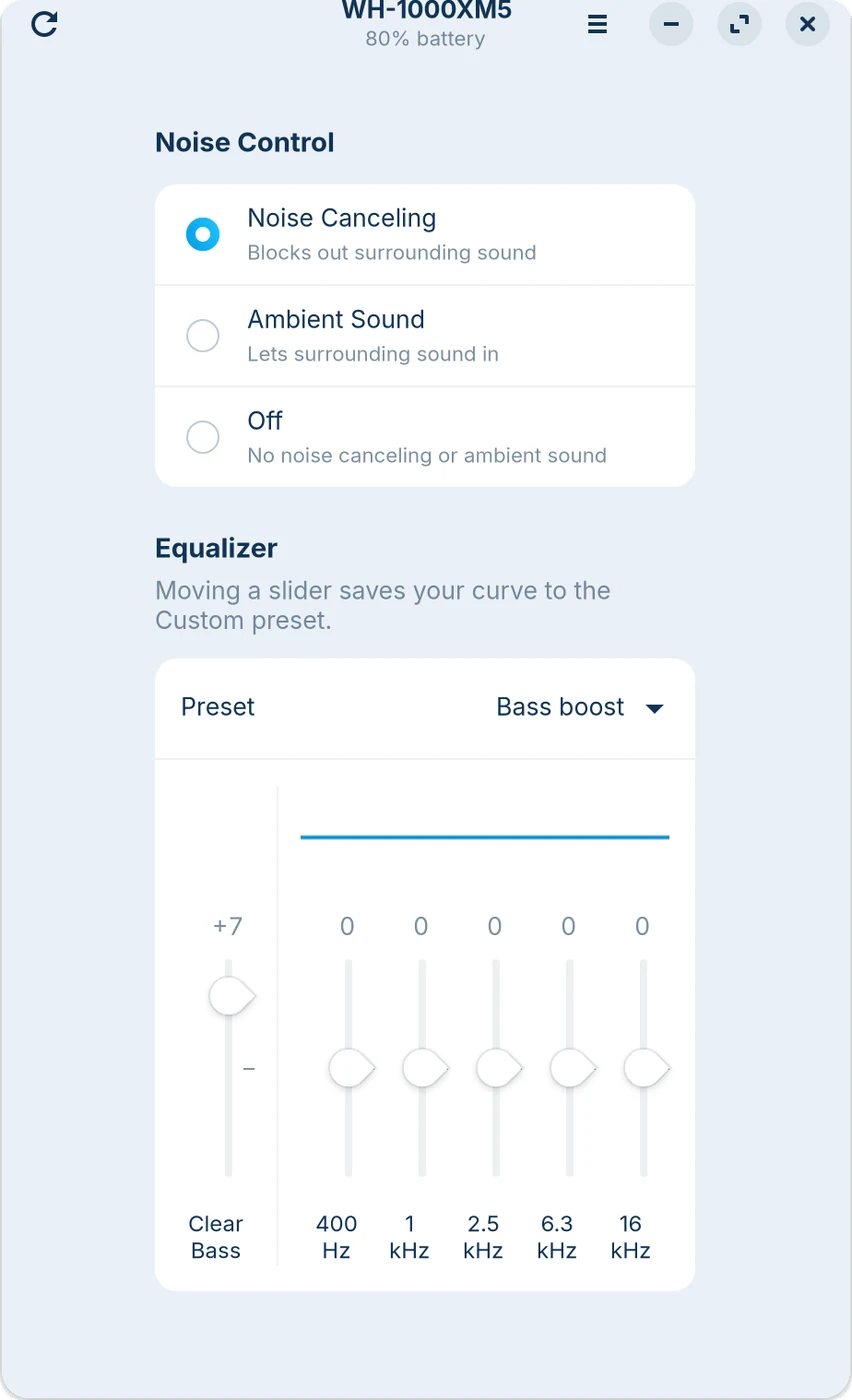
The controls lived on your phone while the headphones sat on your head at the computer. sonyeq puts them in a desktop app, a Quick Settings toggle and the terminal.
Sony’s own support page for the app says it plainly: There is no PC app available.
Settings are stored in the headset, so whatever you set here is still set on your phone.


Type a command, see the bytes
sonyeq speaks the headset’s own protocol. Edit the command and this shows exactly what it would send over Bluetooth.
- Does
- Ambient sound on, level 12 of 20, focus on voice off
- Sends
3e 0c 00 00 00 00 07 68 17 01 01 01 00 0c a1 3c- Headset answers
69 17 01 01 01 00 0c
Every frame starts with 3e and ends with 3c; the byte before the end is a checksum.
What you can change
Flip a switch to preview what each setting does. These switches only change this page, not your headphones.
Shut out the train.
Noise cancelling on. Your ambient level stays saved for later.
Let the room back in.
Ambient sound on, set from 1 to 20. Turning it on turns noise cancelling off.
Keep voices, lose the hum.
Focus on voice on. It works whenever ambient sound is on.
Add weight under the bass.
Clear Bass +5 dB. The five bands at 400 Hz to 16 kHz stay where they were.
See the battery at a glance.
Battery percent under the Noise Control toggle and in the app header.
First, download it.
One file, about 30 KB. Pick .deb for Ubuntu, Debian, Zorin and Mint, or .rpm for Fedora.
$ sudo apt install ./sony-headphones-linux_0.1.0-1_all.deb
Setting up sony-headphones-linux (0.1.0-1) ...
$ sonyeq info
WH-1000XM5
noise control: supported
battery: supported
Bluetooth
- Download
- Install
- Connect
- Control
Pick the package for your system
sudo apt install ./sony-headphones-linux_0.1.0-1_all.debWhat the package does
- Copies files only. The .deb and .rpm run no install scripts; check with
dpkg-deb -corrpm -qlpbefore installing. - Runs as you, not as root, and never uses the network. It only talks to your headphones over Bluetooth.
- The code is plain Python you can read in
/usr/share/sony-headphones-linux/. - The checksums above confirm the download is complete and unchanged on its way to you.
Remove it
sudo apt remove sony-headphones-linuxsudo dnf remove sony-headphones-linuxflatpak uninstall com.andriar.SonyHeadphones
Before you install
Which headphones does it work with?
Tested on the WH-1000XM5. Other Sony models that use the same newer control protocol, such as the WH-1000XM6 and WF-1000XM5, should be found and show only the controls they report, but nobody has tried them yet. The WH-1000XM3 and XM4 use an older protocol and are not supported yet; the tool says so instead of guessing.
Is this made by Sony?
No. It is an independent, unofficial project, not affiliated with or endorsed by Sony. Sony and WH-1000XM5 are trademarks of Sony Group Corporation and are used here only to say which headphones it works with.
Can I keep the Sony app on my phone?
Yes. The headset keeps its own settings, so a change made on Linux shows up in the app and the other way round. Close the app while you use sonyeq: the headset takes one control connection at a time.
Does it need root or a background service?
No. It runs as your user and talks to the headset through BlueZ, the standard Linux Bluetooth stack. Only installing the package asks for sudo.
Where do the controls appear?
Everywhere, the Sony Headphones app in your app grid and the sonyeq command. On GNOME 45 to 48, a Noise Control toggle in Quick Settings. To turn it on, log out and back in once after installing, then run gnome-extensions enable sony-headphones@andriar.github.io or switch it on in the Extensions app. Newer GNOME releases do not load it yet; the app works there. On other desktops, a tray icon instead. Tested on Zorin OS 18 with GNOME 46.
It says it cannot find or reach my headphones
“no paired Sony headset found”: pair the headphones in your Bluetooth settings first.
“paired but not connected”: turn them on, or run the bluetoothctl connect command it prints.
“no ACK” or “cannot open the control channel”: the Sony app on your phone is probably connected. Close it, or turn off Bluetooth on the phone, and try again.
“another program is still talking to the headset”: the app, the toggle and the command take turns. Wait a second and try again.
My model is not on the list. Will it work?
Try it: run sonyeq info with the headphones connected. It only reads from the headset and lists what it reports, so you see straight away which controls will work. This page only calls a model tested after it has been tried on real hardware.